In this post I’ll walk through how NodeStrike uses a custom UDP implementation to power online multiplayer in Godot—and why that matters.
Implementations Using ENet
Godot ships with its own high-level networking layer built on ENet. It covers sync data, RPCs, and connection management out of the box. Because it’s engine-native, running a server means you need a headless Godot executable—which adds overhead even when graphics and audio are stripped.
Peer-to-Peer (ENet — Godot)
Direct peer-to-peer works well for simple or local network games, but it has real limits:
- Network restrictions — many home routers block unsolicited inbound connections, making direct peer connections unreliable outside local networks.
- Host authority — all state originates from Peer A, so if the host drops, the session dies.
For online play a relay server resolves the routing problem:
Peer-to-Server
A central authoritative server is a cleaner model for online multiplayer: all clients connect to one endpoint, the server owns state, and any client can join or drop without taking others down.
Godot Client → Godot Server (ENet)
One approach keeps everything inside the Godot ecosystem. A Python HTTP API acts as a matchmaker: when a client asks for a game, the API spins up a headless Godot instance and returns its port.
The downside: each Godot server instance still carries full engine overhead, which limits how many concurrent games a single host can support.
Godot → Custom Server (C++ / Go / Python UDP)
This is the core approach for NodeStrike. Bypassing ENet lets us write only the code we actually need—no scene tree, no physics tick, no engine overhead.
For reference material on raw UDP: UDP server–client implementation in C/C++
Why UDP over TCP?
- Lower latency — no handshake or retransmission delay; stale packets are simply dropped.
- Higher throughput — less per-packet overhead means more state updates per second.
- Scalability — a single-threaded UDP loop can handle hundreds of clients without thread-contention or kernel TCP buffers becoming a bottleneck.
The NodeStrike Benchmarking Project
To rigorously compare a custom C++ UDP server against Godot’s ENet under identical load, NodeStrike was built to scale from a handful of clients up to hundreds. Here is what that work involved.
Phase 1 — Moving from Azure to GCP
Azure’s student quotas, restricted regions, and connection-drop issues made large-scale VM fleets impractical. Switching to Google Cloud Platform (GCP) gave us stable, fast VM provisioning and teardown at the scale required.
Phase 2 — Automation Scripts
Three Python tools drive the whole pipeline:
| Script | Role |
|---|---|
gcp_nodestrike_fleet.py |
Provisions 1 server VM + 3 client VMs, uploads and compiles code, runs tests, downloads logs, tears everything down. |
discpatch.py |
Orchestrates a test campaign—ramps client counts slowly (1 → 10 → 11 → … → 300), holding each state for a set window to find the exact degradation threshold. |
analyze_granular_results.py |
Processes millions of data points into CSV files and HTML reports covering CPU, tick rate, ping, and failure events. |
Phase 3 — Protocol Fixes
Before running the large tests, critical issues were found and fixed:
- 8-bit player ID overflow — the C++ server used
uint8_tIDs, which would wrap around after 255 players. Upgraded to 32-bit IDs and added packet chunking to stay within MTU. - Godot ENet payload size — ENet was sending full Dictionary snapshots. Switched to a packed
PackedByteArraybinary format, dramatically cutting CPU load. - C++ ping measurement — the server was reporting 0 ms latency because no round-trip timing existed. Added a ping/pong packet system for accurate latency under load.
Phase 4 — 300-Client Results
| Backend | Result |
|---|---|
| C++ UDP | ✅ 300 clients, ~19 Hz tick rate, <5% server CPU, 7 ms p95 latency |
| Godot ENet | ⚠️ 300 clients connected, but degraded sharply after ~148 clients — p95 latency exceeded 2,000 ms. Server CPU stayed low; the client VMs running headless Godot hit 100% CPU, revealing that ENet is expensive on the client side. |
Running the Tools
After authenticating with gcloud auth login, run a full test campaign with the dispatcher:
python ".\southfire server\discpatch.py" `
  --project tonal-feat-507919-j7 `
  --profile granular `
  --execute
By default this tests both ENet and C++ from 1 up to 300 clients, holding each count for 10 seconds and repeating 3 times. Reports are saved automatically to bench_results_gcp/.
Collected Data and Benchmarks
The interactive charts below use Plotly.
Experiment Configuration: The graphs below use an expedited run — 1 repetition and 3 seconds per state — rather than the full 3 repetitions × 10 seconds shown in the table. The full configuration is the target for the final paper.
| Setting | Value |
|---|---|
| Backends | ENet binary snapshots, then C++ UDP |
| Client counts | 1, then 10–300 |
| States per backend | 292 |
| Repetitions | 1 |
| Time per state | 3 seconds |
| Total measurements | 1,752 |
| Server VM | e2-standard-2 |
| Client VMs | 3 × e2-standard-2 |
| Zone | us-central1-a |
| Join requirement | 99% |
| C++ tick requirement | 18 Hz |
| Incomplete snapshot limit | 1% |
| Raw measurement time | 4 hr 52 min |
| Actual time taken | 7 hours |
(Raw data: Google Sheets)
Received Rate vs. Target Clients
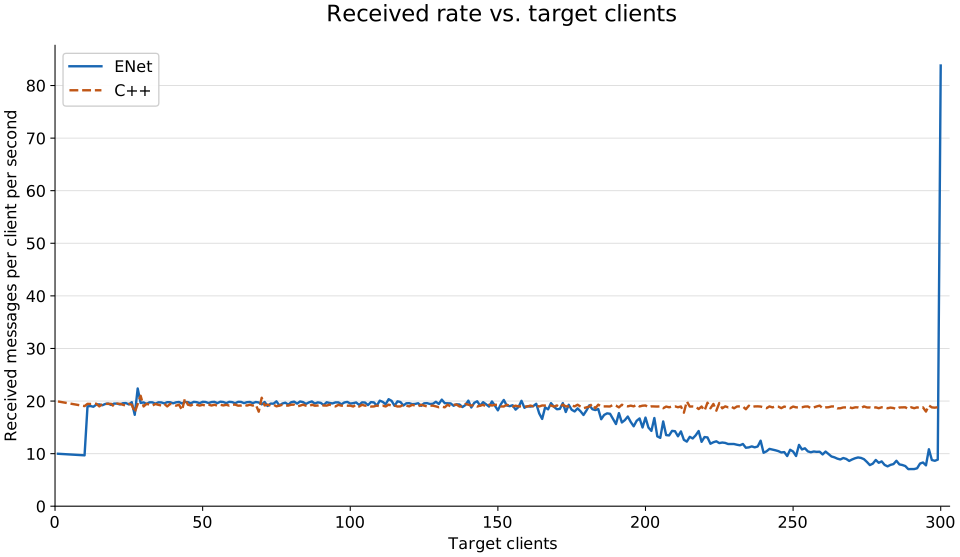
Each backend has 292 recorded points: 1 client, then 10–300 in single increments. Values are unsmoothed, including the ENet spike at 300 clients.
Packet Loss Events vs. Target Clients
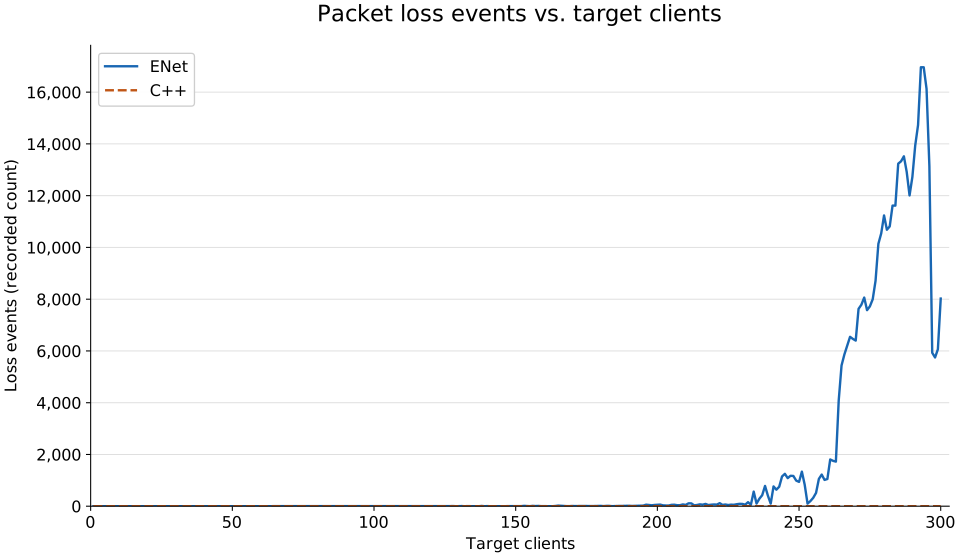
loss_events is a raw event count, not a percentage. C++ records zero loss events at every client count in this dataset. Measurement durations vary, so counts are not normalized per second.
How Do Different Games Handle Multiplayer?
While building NodeStrike, two broad models emerged:
-
Real-time / authoritative-server multiplayer A live copy of the game state runs on a server. Players interact with it in real time; every position and action is authoritative. Time and latency matter — a 200 ms spike is immediately felt. Used by shooters, MOBAs, racing games.
-
Turn-based / message-passing multiplayer State is a set of numbers; turns are transmitted as messages. There is no live simulation — only discrete state transitions. Latency is irrelevant. Used by chess, card games, and other async strategy games.